How to use
Overview table
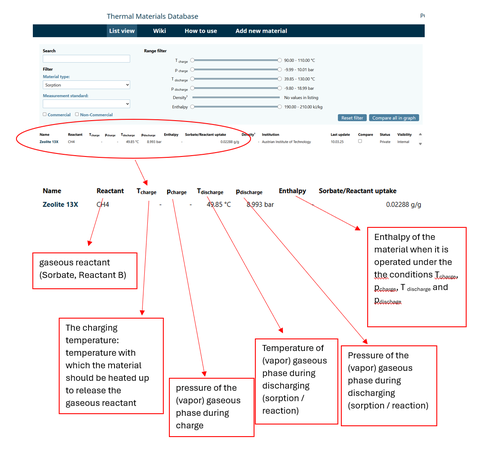
The overview table should give the characteristic values for the material. Please provide values that characterize the material to be used in a storage. Give temperature and pressure conditions for the adsorption and desorption which should be applied to reach a certain storage capacity on the material level. The given enhalpy must belong to the given temperatures and pressure conditions.
The density value will be automatically taken from the stored measurement. The value will be chosen which is closest at 25°C.
The following figure describes the values expected in the overview table:
Add new material
Material type: Choose Sorption or Thermochemical
Material Designation: Name of the material e.g. Zeolite
Description: Give some description for the material
Institution/Affiliation: Filled automatically according to your registration data Reference: Give a link to a reference (if possible) e.g. a doi
If sorption was chosen:
Sorbent: The active material e.g. Zeolite
Sorptive: The gaseous material being adsorbed (e.g. H2O)
Sorbate: The Sorptive adsorbed to the Sorbent (combination of both)
Data for Sorbent:
Chemical formula: Give the chemical formular when possible
Molecular weight: The molecular weight of the material
Manufacturer: Manufacturer of the material can be different to the source of supply
Source of supply: Distributor of the material
Color: The color of the material
Shape: The shape of the material e.g. powder, pellets, etc.
CAS No.: If commercially available give the CAS No.
Data for Sorptive:
Chemical formula: Give the chemical formula when possible e.g. H2O
Molecular weight: The molecular weight of the material
CAS No.: Give the CAS-No.
Source of supply: Distributor of the material
Data for Sorbate:
Sorbate: Give the name or chemical formula of the sorbate (if possible)
The following six values will be given in the overview table
Tcharge: Temperature of the Sorbate for desorption of the sorptive. Value will be shown on the overview table
pcharge: Pressure of the sorptive while desorbing it
Tdischarge: Temperature of the sorbent during adsorption
pdischarge: Pressure of the sorptive during adsorption
Sorptive uptake: The mass of the sorptive adsorbed under the given conditions
Enthalpy: The enthalpy change between the given temperature und pressure conditions
If thermochemical was chosen:
Reactant A: The active material e.g. Na2S
Reactant B: The gaseous material in the reaction (e.g. H2O)
Reaction: The reaction between reactant A and reactant B e.g. Na2S½H2O + 4½H2O -> Na2S5H2O + heat
Data for Reactant A:
Chemical formular: Give the chemical formular when possible
Molecular weight: The molecular weight of the material
Manufacturer: Manufacturer of the material can be different to the source of supply
Source of supply: Distributor of the material
Color: The color of the material
Shape: The shape of the material e.g. powder, pellets, etc.
CAS No.: If commercially available give the CAS No.
Data for Reactant B:
Chemical formula: Give the chemical formula when possible, e.g. H2O
Molecular weight: The molecular weight of the material
CAS No.: Give the CAS-No.
Source of supply: Distributor of the material
Data for Reaction:
Reaction: Give the chemical formula for the reaction (if possible) e.g. Na2S½H2O + 4½H2O -> Na2S5H2O + heat The following six values will be given in the overview table
Tcharge: Temperature of the reacted material at which reactant B is released. Value will be shown on the overview table
pcharge: Pressure at which reactant B is released .Value will be shown on the overview table
Tdischarge: Temperature of the reactant A at the reaction. Value will be shown on the overview table.
pdischarge: Pressure of the reactant B at the reaction.Value will be shown on the overview table
Reactant B uptake: The mass of the reactant B in relation to reactant A reacted under the given conditions
Enthalpy: The enthalpy change between the given temperature and pressure conditions
Add measurements
Measurement for the following properties can be added:
- Sorptive/Reactant B uptake: It´s suposed to be a TGA or TG-DSC measurement: TGA (TG-DSC)
- Density measurement
- Thermal Conductivity measurement
- Thermal Diffusivity measurement
Add new TGA (TG-DSC) measurement
Choose Add new measurement then following table appears:
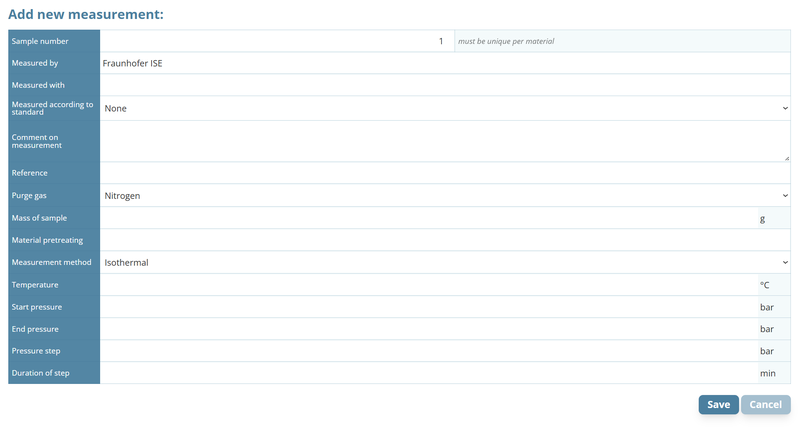
Following field should be filled:
- Sample number: If you upload several measurements for the material then increase the number for each sample, starting with 1
- Measured by. Institution which has measured the material. Automatically the institution is filled which you have given at the registration
- Measured with: Give the device you used for the measurement (e.g. TA-Instruments TGA 5500)
- Measured according to standard: Choose a standard you used for the measurement. If your standard is not available, please write an email to (to be defined)
- Comment on measurement: You can comment your measurement (e.g. if the requested parameters are not fitting to your measurement)
- Reference: Give a reference for the measurement in form of a web-address (e.g. a publication if already published as doi)
- Purge gas: Choose you purge gas
- Mass of sample: Give the mass of the sample measured
- Material pretreating: Give a description of how you treated the material before the measurement (e.g. drying at 200°C under vacuum at 10 mbar)
- Measurement method: Choose Isothermal or Isobaric
If Isothermal:- Temperature: Give the temperature
- Start pressure: Give the starting pressure
- End pressure: Pressure at the end of the measurement
- Pressure steps: Value of the pressure step (its expected the all steps are equal)
- Duration of step: Give the duration of the steps (its expected that all steps have the same duration)
- if isobaric
- Pressure: Give the pressure
- Start temperature: Give the starting temperature
- End temperature: Give the temperature at the end of the measurement
- Temperature step: Value of the temperature step (it´s expected that all steps are equal)
- Duration of step: Give the duration of the steps (it´s expected that all steps have the same duration)
The data table to be uploaded for TGA (TG-DSC) data
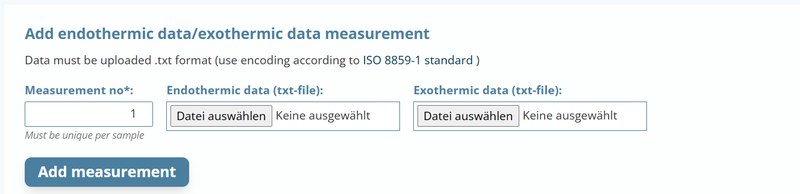
Data has to be given in ASCII format according to ISO 8859-1 standard. Data should be given for the endothermic process (desorption of the material) and the exothermic process (adsorption of the material)
The graph is processed using the first and the third column of the data table means first column e.g temperature (°C) and third column the sorptive uptake (g/g) .
Each data set contains two measurement tables, the endothermic data and the exothermic data. You can upload several data sets. It´s recommended to upload 3 data sets for each sample (3 measurements). The data sets are numbered starting from 1 and then increased by 1 for each data set uploaded (Change the number by yourself).
The following image shows a screenshot of the data upload
Add new density measurement
Choose Add new measurement then following table appears:
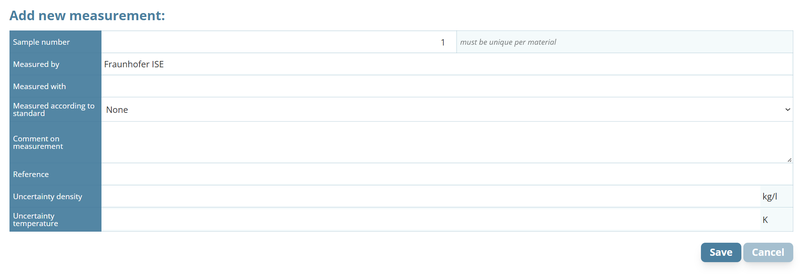
Following field should be filled:
- Sample number: If you upload several measurements for the material then increase the number for each sample, starting with 1
- Measured by. Institution which has measured the material. Automatically the institution is filled which you have given at the registration
- Measured with: Give the device you used for the measurement (e.g. Anton Paar DMA 4500, Archimedes principle self built)
- Measured according to standard: Choose a standard you used for the measurement. If yorur standard is not available, please write an email to (to be defined)
- Comment on measurement: You can comment your measurement (e.g. if the requested parameters are not fitting to your measurement)
- Reference: Give a reference for the measurement in form of a web-address (e.g. a publication if already published as doi)
- Uncertainty density: Give an uncertainty for your measurement
- Uncertainty temperature: Give an uncertainty for the determination of temperature
The data table to be uploaded for density data
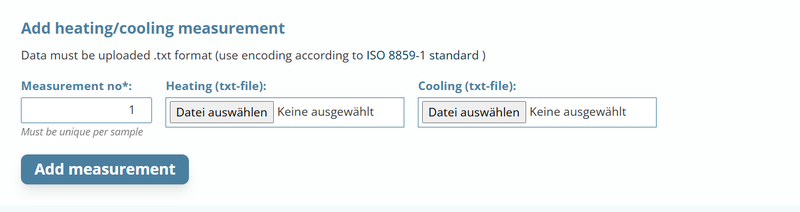
Data has to be given in ASCII format according to ISO 8859-1 standard.
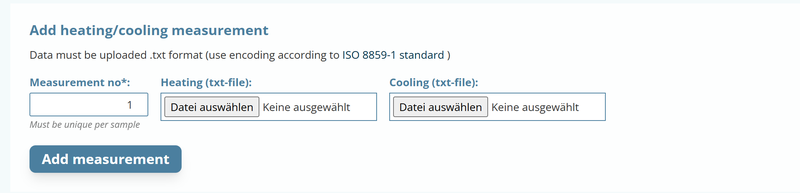
Data should be given for the heating and cooling measurement for the sample.
The graph is processed using the first and the second column of the data table means first column e.g temperature (°C) and second column the density (kg/l) .
Each data set contains two measurement tables, the heating data and the cooling data. You can upload several data sets. It' s recommended to upload 3 data sets for each sample (3 measurements). The data sets are numbered starting from 1 and then increased by 1 for each data set uploaded (Change the number by yourself).
The following image shows a screenshot of the data upload
Add new thermal conductivity measurement
Choose Add new measurement then following table appears:
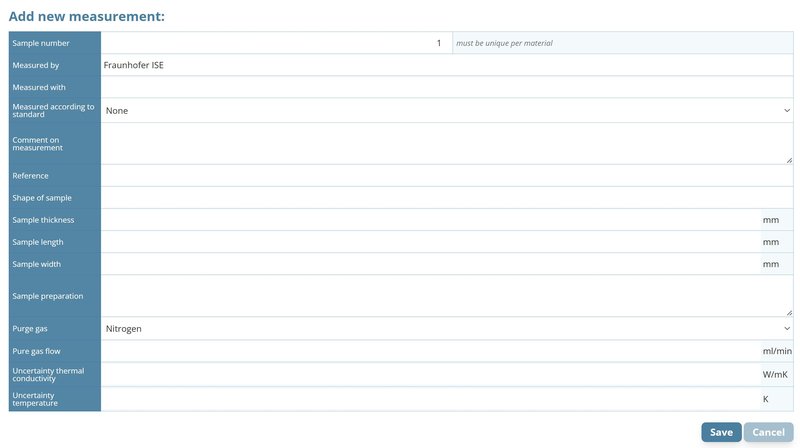
Following field should be filled:
- Sample number: If you upload several measurements for the material then increase the number for each sample, starting with 1
- Measured by. Institution which has measured the material. Automatically the institution is filled which you have given at the registration
- Measured with: Give the device you used for the measurement (e.g. Linseis THB)
- Measured according to standard: Choose a standard you used for the measurement. If your standard is not available please write a email to (to be defined)
- Comment on measurement: You can comment your measurement (e.g. if the requested parameters are nit fitting to your measurement)
- Reference: Give a reference for the measurement in form of a web-address (e.g. a publication if already published as doi)
- Shape of sample: Can be round, square, etc
- Sample thickness: Thickness of the sample
- Sample length: length of the sample (put diameter if shape is round)
- Sample width: width of the sample (put diameter if shape is round)
- Sample preparation: Insert a description how the sample was prepared. e.g. how fast was it cooled if it was prepared by solidification of a liquid.
- Purge gas: choose the purge gas
- Purge gas flow: Give the purge gas flow rate
- Uncertainty thermal conductivity: Give the uncertainty for the determined thermal conductivity value (average for all values)
- Uncertainty temperature: Give the uncertainty for the temperatures
The data table to be uploaded for thermal conductivity data
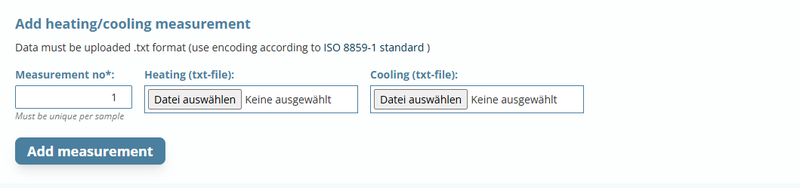
Data has to be given in ASCII format according to ISO 8859-1 standard.
Data should be given for the heating and cooling measurement for the sample.
The graph is processed using the first and the second column of the data table means first column e.g temperature (°C) and second column the thermal conductivity (W/m k) .
Each data set contains two measurement tables, the heating data and the cooling data. You can upload several data sets. It' s recommended to upload 3 data sets for each sample (3 measurements). The data sets are numbered starting from 1 and then increased by 1 for each data set uploaded (Change the number by yourself).
The following image shows a screenshot of the data upload
Add new thermal diffusivity measurement
Choose Add new measurement then following table appears:
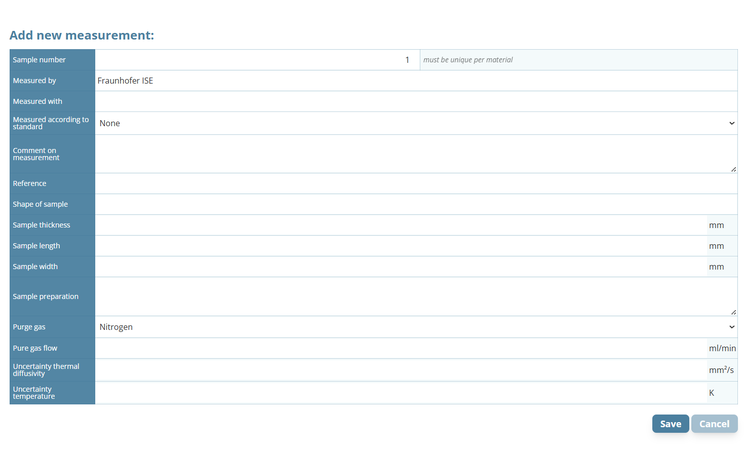
Following field should be filled:
- Sample number: If you upload several measurements for the material then increase the number for each sample, starting with 1
- Measured by. Institution which has measured the material. Automatically the institution is filled which you have given at the registration
- Measured with: Give the device you used for the measurement (e.g. Laser Flash LFA 415)
- Measured according to standard: Choose a standard you used for the measurement. If your standard is not available please write a email to (to be defined)
- Comment on measurement: You can comment your measurement (e.g. if the requested parameters are not fitting to your measurement)
- Reference: Give a reference for the measurement in form of a web-address (e.g. a publication if already published as doi)
- Shape of sample: Can be round, square, etc
- Sample thickness: Thickness of the sample
- Sample length: length of the sample (put diameter if shape is round)
- Sample width: width of the sample (put diameter if shape is round)
- Sample preparation: Insert a description how the sample was prepared. e.g. how fast was it cooled if it was prepared by solidification of a liquid.
- Purge gas: choose the purge gas
- Purge gas flow: Give the purge gas flow rate
- Uncertainty thermal diffusivity: Give the uncertainty for the determined thermal diffusivity value (average for all values)
- Uncertainty temperature: Give the uncertainty for the temperatures
The data table to be uploaded for thermal diffusivity data
Data has to be given in ASCII format according to ISO 8859-1 standard.
Data should be given for the heating and cooling measurement for the sample.
The graph is processed using the first and the second column of the data table means first column e.g temperature (°C) and second column the thermal diffusivity (mm²/s) .
Each data set contains two measurement tables, the heating data and the cooling data. You can upload several data sets. It' s recommended to upload 3 data sets for each sample (3 measurements). The data sets are numbered starting from 1 and then increased by 1 for each data set uploaded (Change the number by yourself).
The following image shows a screenshot of the data upload